





Quick summary
This guide explains how to fix alternate page with proper canonical tag issues in Google Search Console, ensuring search engines recognize your primary content and avoid duplicate indexing. Identify canonical sources, implement tags on alternate pages, verify in Search Console, and monitor performance. Use 301 redirects if needed and strengthen authority with backlink strategies to boost visibility, rankings, traffic, and revenue.
Looking to improve your healthcare site's visibility? Check out our list of the best medical SEO companies that can help you rank higher.
Need help fixing alternate page with proper canonical tag?
Much like trying to find a needle in a haystack, making sure your web pages are discoverable is a common challenge. If this sounds familiar, you're not alone. Imagine crafting alternate pages only to face confusion with Google.
At Embarque, our expertise lies in unraveling digital intricacies, making us your ally for addressing common challenges in the digital landscape. In this article, we'll show you exactly how to fix alternate page with proper canonical tag, ensuring that your content doesn't merely exist online but stands out distinctly.
Why listen to us?
Facing challenges in Google Search Console with canonical tags is common for many businesses. At Embarque, we've directly tackled these issues. Our work with MentorCruise showcases our expertise. Despite having a strong platform, MentorCruise struggled with SEO, particularly in maximizing their reach through Google. We overhauled their SEO strategy, focusing on targeted keyword research, content optimization, and canonical tag management. This approach led to a staggering 1,600% annual revenue growth and over 2 million site visits per year.
For a downloadable software program, we revamped their content and SEO approach, recovering 50% of their peak traffic and boosting their referring domains sixfold!
By resolving SEO hurdles like canonical tag mismanagement, small businesses we've worked with have seen significant traffic and revenue boosts. Trust us to bring similar transformative results by showing how to fix alternate page with proper canonical tag in Google Search Console's tools.
What does an alternate page with proper canonical tag mean?
In simple terms, an alternate page is like a sibling to your main content, made for specific variations or needs. But, when Google faces a bunch of similar pages, it can get confused about which one's the real deal. This is where the canonical tag steps in – it works like a virtual pointer, pointing search engines to the original, authoritative page. It ensures your content takes the correct route online, leading search engines straight to the primary, authoritative source.

Why does the ‘Alternate page with proper canonical tag’ status happen?
Content variations
At times, you create alternate pages with minor tweaks in content – perhaps different wording or additional details. These subtle variations can befuddle search engines, making it challenging for them to discern the most authoritative version.
Imagine you have a product page with alternate versions for various sizes. The differences might seem minor, but without a clear indication, Google might grapple with determining the primary source.
URL structure dilemmas
If the URL structure of your alternate page differs slightly from the main page, Google might treat it as a distinct entity. This occurs because the URL is a critical identifier for search engines in understanding page relationships.
For instance, consider you run an ecommerce site, and your main product page has a standard URL structure like /products/product-name/. Now, if an alternate version appends additional parameters, like /products/product-name/?variant=2, Google may treat it as a separate page. This seemingly small alteration can lead to confusion for search engines.
Dynamic content challenges
Websites often feature dynamic content that changes frequently based on user interactions or real-time updates. In such cases, Google may struggle to pinpoint the primary source, as the content is in a constant state of flux. This could limit your content's ability to compete.
Think of a news website where the homepage dynamically displays the latest headlines. If Google indexes the page during a major news update, it might not immediately recognize the stable, authoritative content beneath the dynamic facade.
Pagination and infinite scroll
Websites employing pagination or infinite scroll might encounter challenges, as multiple pages dynamically load on a single URL. Without proper guidance, search engines might find it perplexing to identify the main content source.
An ecommerce site with products loaded via infinite scroll might have alternate pages showcasing different product variants. Without a clear canonical tag, search engines may struggle to recognize the definitive product page.
How to find alternate page with proper canonical tag in Google Search Console
- Log into Google Search Console.
- In the left navigation panel, under Indexing, click on Pages.
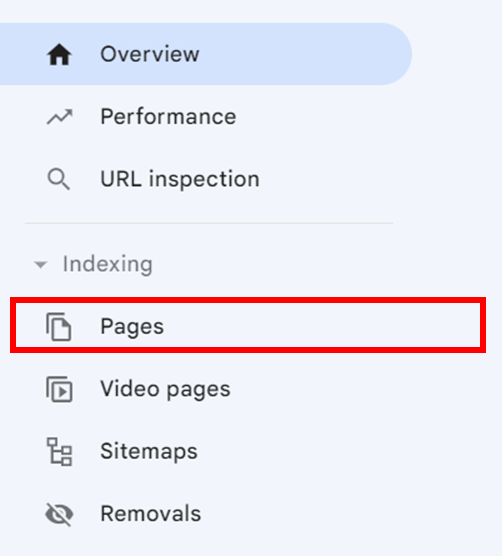
- Scroll down under Why pages aren’t indexed.

- Click on Alternate page with proper canonical tag.

Step-by-step: How to fix alternate page with proper canonical tag
Step 1: Identify the canonical source
The first crucial step is to determine the primary page that should be considered the authoritative source. This involves examining your content for consistency and relevance. Ensure that the selected page accurately represents the core information or product you intend to showcase.
For instance, If you have alternate pages for different product variants, identify the main product page that provides the most comprehensive and relevant information about the entire product range.
Step 2: Implement the canonical tag
Once you've pinpointed the original, authoritative page, it's time to insert the canonical tag within the HTML of the alternate pages. This ensures search engines recognize the main page.
If you've determined that your main product page is the canonical source, add a canonical tag to the HTML of alternate pages for different product versions.
Step 3: Verify on Google Search Console
Utilize Google Search Console to communicate directly with Google. Verify that the canonical tags you've implemented are recognized and accepted by the search engine. This step ensures that Google acknowledges the specified canonical source.
Log in to Google Search Console, access the URL Inspection tool, and confirm that the canonical tag is properly identified for your pages.

Step 4: Monitor and adjust
Keep a vigilant eye on the performance of your pages over time. Analyze data from analytics tools to gain insights into how users interact with your content. If necessary, refine and optimize the canonical tags based on these insights to enhance the effectiveness of your SEO strategy.
For example, if you notice changes in user engagement or search rankings, consider adjusting your canonical tags to better align with user behavior and search engine algorithms.
Step 5: Leverage 301 redirects (if needed)
In instances where the alternate page doesn't serve any meaningful purpose and you want to consolidate traffic to the primary page, consider using 301 redirects. These redirects seamlessly guide users and search engines from the alternate page to the identified canonical source.
If you've decided that one of your alternate pages is redundant, implement a 301 redirect to lead users to the main page, ensuring a smooth transition.
Step 6: Regular audits
SEO is an ongoing process, and regular audits are essential to maintaining the accuracy of canonical tags. Conduct periodic reviews of your pages to ensure that canonical tags remain aligned with your content strategy and continue to effectively guide search engine understanding.
Schedule routine checks to review and update canonical tags, especially after making significant changes to your website or content structure.
Resolve alternate page issues with Embarque today!
By implementing these steps and consistently monitoring your website, you can effectively manage alternate pages with proper canonical tags. This ensures that your website's content is accurately indexed by search engines, leading to better visibility, improved ranking, and ultimately, increased traffic and engagement.
Don't let the complexities of alternate pages and canonical tags hold your website back. Contact Embarque today for practical solutions and expert guidance on navigating the digital landscape effectively.
Frequently Asked Questions (FAQ)
What does “alternate page with proper canonical tag” mean in Google Search Console?
An alternate page with proper canonical tag is a page that Google recognizes as a variant of a main page. The canonical tag points search engines to the primary source, preventing duplicate content issues and ensuring that SEO value is consolidated on the correct page.
How do I fix alternate page with proper canonical tag issues?
To fix alternate page with proper canonical tag, first identify the canonical source page. Then, add a canonical tag in the HTML of the alternate page, verify it in Google Search Console, monitor performance, and adjust as needed. 301 redirects may also be used if the alternate page isn’t needed.
Why is fixing alternate page canonical issues important for SEO?
Properly managing canonical tags prevents duplicate content problems, ensures that search engines index the correct page, and helps your website rank higher. Learning how to fix alternate page with proper canonical tag ensures that your SEO efforts aren’t diluted across multiple pages.
Can dynamic pages cause alternate page canonical issues?
Yes. Pages with dynamic content, URL parameters, or product variants can trigger the alternate page with proper canonical tag status. Implementing canonical tags pointing to the primary page resolves confusion for Google and consolidates ranking signals.
How often should I audit canonical tags?
Regular audits are essential. Check how to fix alternate page with proper canonical tag whenever you update content, add new variations, or notice indexing issues. Ongoing monitoring ensures that Google correctly recognizes the authoritative page and maintains proper SEO value.
Do 301 redirects help fix alternate page canonical problems?
Yes. If an alternate page doesn’t serve a distinct purpose, a 301 redirect to the canonical page can complement the canonical tag. This ensures users and search engines are guided to the authoritative page, making your SEO cleaner and more effective.