





Quick summary
This guide explains how to fix the submitted URL blocked due to other 4xx issue errors in Google Search Console and why it matters for indexing and rankings. We cover the most common causes (404s, 403s, redirect chains, outdated URLs, and access restrictions) and walk through a clear step-by-step process to resolve them, validate fixes, and prevent future crawl issues using backlinking strategies.
Why You Need to Fix Submitted URL Blocked Due to Other 4xx Issue
We've all experienced that exasperating moment when attempting to access a crucial website, only to be met with the discouraging "404 Not Found" error. Today, we're addressing a common obstacle that might be hindering your website's journey, the perplexing "submitted URL blocked due to other 4xx issue" on Google Search Console.
At Embarque, we want to simplify the complexities of online presence, ensuring businesses thrive in the digital realm. We specialize in navigating the intricacies of SEO, making us your go-to guide for overcoming hurdles like the ‘submitted URL blocked due to other 4xx issue.’
Now, let's dive into the core of the matter, demystifying this technical glitch, and equipping you with the knowledge to enhance your website's visibility.
Why listen to us?
Resolving the 'submitted URL blocked due to other 4xx issue' error in Google Search Console is pivotal for small businesses, helping to boost traffic, speed up indexing, and increase revenue. We've seen this firsthand with our clients. For Valheim Server Hosting, we turned around their non-existent organic search presence through extensive keyword research for relevant queries which led to $35,000 in revenue in under five months.
Our tailored approach to topical authority and high-quality content rapidly improved their Google Search rankings. These case studies exemplify our expertise in effectively addressing SEO challenges to help startups scale fast.
What is the ‘submitted URL blocked due to other 4xx issue’ status on Google Search Console?
The term ‘submitted URL blocked due to other 4xx issue’ on Google Search Console transcends mere technical jargon. For website owners, it represents a formidable obstacle that hampers the site's optimal performance. This challenge materializes when search engines encounter hurdles in the form of 4xx status codes while crawling through your website's content.
These 4xx status codes, denoting client errors, indicate issues from the user's end, suggesting that the requested web page either couldn't be accessed or was not found.
To better understand these HTTP status codes and their implications, it's crucial to familiarize yourself with the intricacies of the "4xx" category. This category encompasses a range of client-side errors.
Now, let's delve into the specific reasons behind the occurrence of the ‘submitted URL blocked due to other 4xx issue’ error message and discuss how this challenge can significantly impact the online visibility of your website as a site owner.
Types of errors that may trigger ‘submitted URL blocked due to other 4xx issue’ in Google Search Console
‘submitted URL blocked due to other 4xx issue’ on Google Search Console may encompass various types of errors, each with its specific implications. Here are several common types:
- 404 (Not Found): This error occurs when the requested page is not found on the server. It often results from outdated or mistyped URLs, deleted content, or broken links.
- 410 (Gone): Similar to a 404 error, a 410 error indicates that the requested resource is permanently gone. It could be due to intentional removal or restructuring of content.
- 403 (Forbidden): A 403 error signifies that the server understood the request but refuses to authorize it. This issue may arise due to restricted access, improper permissions, or security configurations.
- 401 (Unauthorized): This error occurs when access to a resource is denied due to lack of proper authentication. It could result from password issues, expired credentials, or other authentication failures.
- 408 (Request Timeout): A 408 error indicates that the server timed out while waiting for a request from the client. This could be due to slow network connections or server overload.
- 429 (Too Many Requests): A 429 error occurs when a user exceeds the rate limits set by the server. This can happen if a user makes too many requests in a short period.
- 414 (URL Too Long): This error arises when the requested URL is too long for the server to process. It can occur due to excessively lengthy URLs or misconfigurations.
- 444 (No Response): In some cases, a server might not provide any response to a request, resulting in a 444 error. This could happen due to server misconfigurations, network issues, or intentional suppression of responses.
Why does ‘submitted URL blocked due to other 4xx issue’ happen?
Broken links
The occurrence of the ‘submitted URL blocked due to other 4xx issue’ often traces back to the presence of broken or dead-end links within your website. When search engines attempt to navigate through your site and encounter these dysfunctional links, it triggers 4xx errors. Identifying and rectifying broken links is crucial for maintaining a seamless online experience.
Redirect chains
Another common culprit behind the ‘submitted URL blocked due to other 4xx issue’ is the existence of complex redirect chains. When your website employs intricate redirection structures, it can confuse search engine bots during the crawling process, resulting in the manifestation of 4xx errors.
Outdated content
The dynamics of online content evolve over time, and the failure to keep up with these changes may lead to the emergence of 4xx errors. Specifically, outdated URLs associated with your content can become problematic.
To mitigate this, we advise website owners to conduct regular content audits. By keeping your website content up-to-date and promptly updating URLs, you not only enhance user experience but also maintain a healthy online presence, preventing 4xx errors from hindering your site's performance.
Inconsistent URL structure
Incoherent or inconsistent URL structures can contribute to the occurrence of the ‘submitted URL blocked due to other 4xx issue’ error message. Search engines rely on uniformity to navigate through websites effectively. If your URL structure lacks consistency, it may lead to confusion and trigger 4xx errors. It’s best to ensure a standardized and coherent URL structure across your website to mitigate this issue.
Server-level request filtering
Some 4xx errors, including those flagged as “submitted URL blocked due to other 4xx issue,” can occur due to server-level restrictions. For example, if your server’s request filtering module is configured to deny requests containing double escape sequences, Googlebot may be blocked from crawling legitimate URLs. In such cases, adjusting server settings or consulting your hosting provider is necessary to resolve these blocks.
How to find ‘submitted URL blocked due to other 4xx issue’ on Google Search Console
- Log in to Google Search Console and select property (website).
- In the left navigation panel, under Indexing, click on Pages.
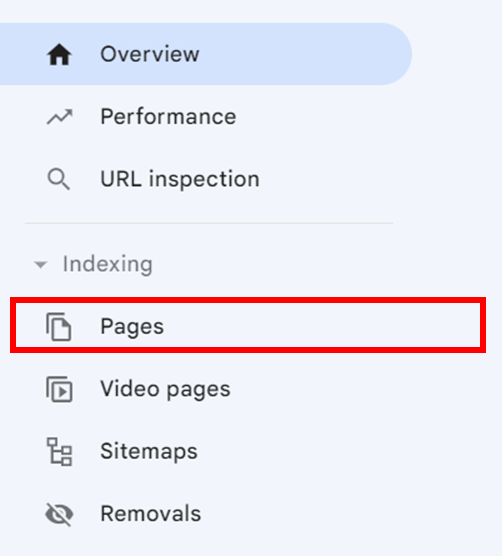
- Scroll down under Why pages aren’t indexed.

- Click on submitted URL blocked due to other 4xx issue.

How we fix ‘submitted URL blocked due to other 4xx issue'
Step 1: Identify and rectify broken links
Broken links can disrupt user experience and trigger 4xx errors. You may employ tools to systematically scan your website, identifying and fixing dysfunctional internal and external links.
Ensuring the functionality of all links within your site is crucial to preventing the ‘submitted URL blocked due to other 4xx issue’ error message. Additionally, leverage insights from Google Search Console to identify crawl errors and broken links efficiently.
Step 2: Streamline redirects
Complex redirect chains can confuse search engines, leading to 4xx errors. Review your website's redirect structure, aiming for simplicity to prevent confusion for search engine bots.
Google Search Console can provide valuable data on the efficiency of your site's redirects.
Step 3: Update outdated URLs
Maintaining up-to-date content is vital to preventing 4xx errors caused by outdated URLs. Regularly audit your website content, focusing on URLs, and update them to reflect current information. This practice not only prevents 4xx errors but also fosters a seamless user experience, contributing to overall positive interactions.
Step 4: Monitor and maintain
Proactive monitoring is key. Use Google Search Console to track submitted URL blocked due to other 4xx issue and fix errors promptly. Utilize Google Search Console to implement ongoing monitoring. Regularly check for crawl errors and address them in a timely manner. Make monitoring a routine part of website maintenance to prevent prolonged 4xx issues and ensure the continuous health of your online presence.
Boost Your Website Visibility by Fixing ‘Submitted URL Blocked Due to Other 4xx Issue’
Tackling the ‘submitted URL blocked due to other 4xx issue’ error message on Google Search Console is a pivotal step for website owners striving to maintain optimal online performance. This technical glitch can significantly impact a site's visibility. However, by understanding specific 4xx errors and having a strategic approach to rectifying these issues, website owners can navigate these challenges effectively.
At Embarque, we recognize the importance of simplifying the complexities of online presence for businesses. If you're ready to improve your website's online presence and organic growth through quality SEO content and backlinking strategies, connect with us today!
Frequently Asked Questions
What does submitted URL blocked due to other 4xx issue mean?
It’s an error in Google Search Console when a submitted page cannot be crawled due to client-side 4xx errors like 404, 403, or 401.
How can I fix submitted URL blocked due to other 4xx issue?
Audit broken links, streamline redirects, update outdated URLs, ensure proper URL structure, and check permissions.
Can backlinks contribute to submitted URL blocked due to other 4xx issue?
Yes. Broken or misdirected backlinks can trigger this error. Maintaining backlink strategies and redirecting outdated links helps.
How long does Google take to recrawl fixed URLs?
Google typically recrawls corrected URLs in a few days to weeks, depending on crawl budget.
Will submitted URL blocked due to other 4xx issue impact SEO rankings?
Yes. Pages with 4xx errors aren’t indexed, which can reduce organic visibility and traffic.