





If you've poked around Bing Webmaster Tools and landed on the crawl information section, you might be wondering what you're actually looking at. The data is there, but it's not always obvious what it means, nor is it clear what you're supposed to do with it.
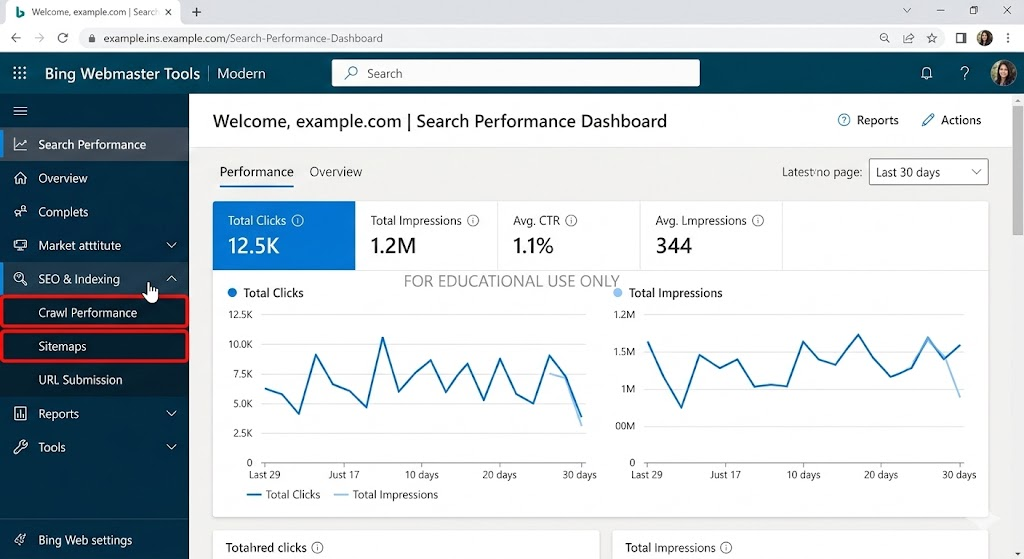
Crawl information is Bing's way of showing you how Bingbot, Bing's web crawler, interacts with your site. It tells you which pages are being visited, how often, if anything is going wrong, and what Bingbot sees when it arrives. Getting familiar with this data is one practical way to improve your site's visibility in search results.
What is crawl information?
Every time Bingbot visits your site, it's doing two things: discovering pages and reading their content so they can be added to or updated in Bing's index. Crawl information is the record of that process, a log of what Bingbot has been doing on your site over time.
In Bing Webmaster Tools, crawl information is broken into a few different reports. Each one covers a different part of the crawling picture, from how many pages are being crawled to which ones are returning errors. Together, they give you a reasonably complete view of whether Bing can access and understand your site.
The crawl summary
The crawl summary is the top-level view. It shows you how many pages Bingbot has crawled over a given period, how much data it transferred, and how your crawl activity has trended over time.
A healthy crawl summary will show consistent activity: Bingbot visiting your pages regularly, with no sudden drops. A sharp decline in crawl activity can be a signal that something has changed: a new robots.txt rule, a server problem, or a drop in the number of pages Bing thinks are worth crawling.
If you've recently published a lot of new content and crawl activity hasn't increased, that's also worth investigating. It may mean Bingbot isn't discovering your new pages as quickly as you'd expect.
Crawl errors
This is often the most actionable part of the crawl information section. Crawl errors tell you which pages Bingbot tried to reach but couldn't access properly. The most common error types you'll see are:
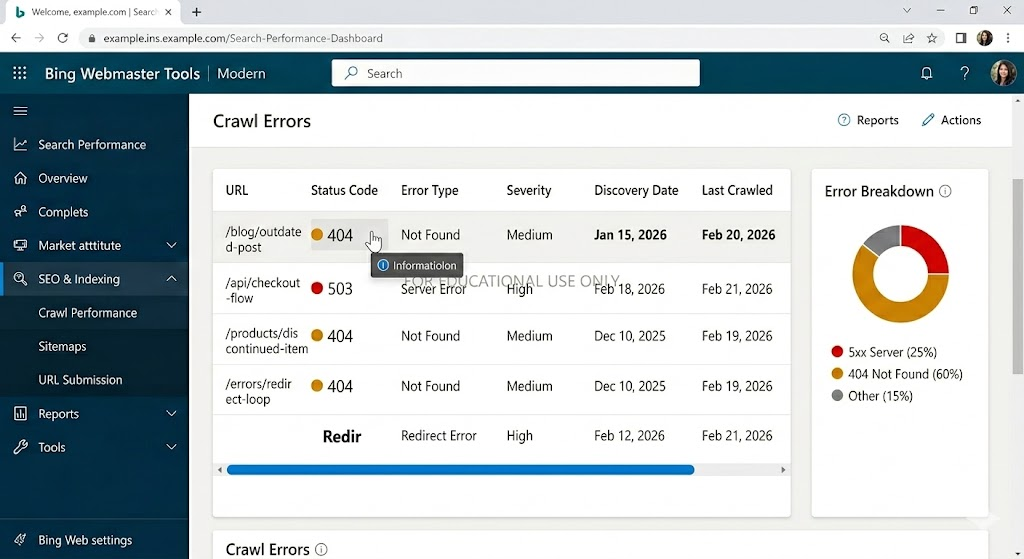
- 404 errors: pages that no longer exist. These are worth fixing if the pages are linked from other parts of your site or from external sources
- 5xx errors: server errors that suggest Bingbot hit your site at a moment when something went wrong on the backend
- Redirect errors: pages that redirect in a loop or through too many hops, making them impossible to resolve
- DNS errors: cases where Bingbot couldn't reach your server at all, usually a sign of a hosting or DNS configuration problem
A small number of 404 errors is normal for most sites as pages get removed and URLs change. But a large volume of errors, or errors on pages you care about, should be addressed. Every page that returns an error is a page Bing can't index, which means it can't show up in search results.
Crawl controls
Bing Webmaster Tools also gives you the ability to influence how Bingbot crawls your site through the crawl controls settings. This is separate from your robots.txt file, though both affect crawl behaviour.
In crawl controls, you can adjust the crawl rate, essentially telling Bingbot to speed up or slow down. This is useful if Bingbot's visits are putting strain on your server, or if you feel it's crawling too infrequently to keep up with your publishing pace.
One thing to be aware of: slowing down the crawl rate too aggressively can delay how quickly your new content gets indexed. Unless you're seeing server performance issues caused by Bingbot, it's generally better to leave the crawl rate at its default setting.
The Robots.txt Tester
Inside the crawl information section, you'll also find a robots.txt tester. This lets you check if your robots.txt file is doing what you think it's doing, specifically, if it's blocking or allowing the pages you intend.
It's surprisingly common for a robots.txt rule to accidentally block pages you actually want Bing to crawl. Running your key URLs through the tester is a quick way to rule this out. If you see that a page you care about is being blocked, fixing the robots.txt rule is usually straightforward.
Why Crawl Information matters for search visibility
Crawl information is the foundation of your site's search performance. If Bingbot can't access your pages, those pages won't appear in search results. No amount of quality content or optimization matters if the search engine can't reach your site in the first place.
This is why checking your crawl information regularly is worth building into your workflow, not just when something seems wrong. Catching a crawl issue early, before it compounds into an indexing problem, is much easier than diagnosing it after the fact.
What to look for in practice
When you open the crawl information section, here's a practical sequence for reading it:
- Start with the crawl summary to get a sense of overall activity and spot any unusual trends
- Move to crawl errors and filter by error type; prioritise fixing errors on pages that matter most to your business
- Check your robots.txt tester for any pages you've recently published or restructured
- If you've made recent changes to your site's structure or redirects, look for redirect errors that might have appeared as a result
- Compare crawl activity against your publishing schedule. If you've added content but crawl numbers haven't moved, Bingbot may not be discovering it
At Embarque, crawl health is one of the first things we look at when a site isn't performing as expected in search. It's not always the most exciting part of the job, but it's foundational. Everything else, content quality, authority building, depends on Bingbot being able to reach and read your pages in the first place.
Takeaway
Crawl information in Bing Webmaster Tools is the record of how Bingbot is accessing your site. It covers which pages are being crawled, which are returning errors, and whether your robots.txt is configured correctly. Keeping an eye on it regularly helps you catch access problems before they affect your rankings.
If something is blocking Bingbot, no amount of great content will make up for it. Get the crawl right first, and everything built on top of it becomes more effective.